Thomas Tingsted Mathiesen GPS, NMEA, WGS-84, GIS and VB.NET
By Thomas Tingsted Mathiesen (tma@tma.dk)
I made this page because I have almost surfed my self to death trying to piece all the different information together - It's out there, but somewhat scattered all over.
My goal is to develop a VB.NET class library where all functionality conserning positioning, Datum conversion, Grid transformation and direct serial interface to an external USB/Serial GPS reciever.

My Linked-In profile
My company - Gaudio ApS
My FaceBook profile
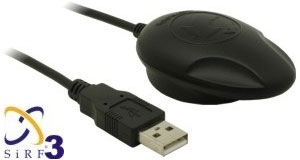
Navilock.de, NL-302U GPS reciever
Last changes made: 16 JUL 2008

  • Index
  • Coordinate formats
  • Get the NMEA linies from the GPS reciever
  • Convert NMEA format to Decimal format
  • Convert from Decimal format to NMEA/WGS-84
  • Calculate distance between two coordinates/locations
  • Calculate direction in degrees between two coordinates
  • Magnetic deviation/declination
  • Using maps.google.com to view Longitude/Latitude
  • Sirf Star III stability test
  • Links & references
  • The .NET GPS API ready for download
    Go to my GPS API page and check out the features :)
    Goto: .NET GPS API


    Contribute to the build of a comprehensive list of GPS/NMEA dumps.
    See sample data from around the globe using different GPS systems.

    Submit serial output, or check out the other dumps


    Please give your comment/rating at the bottom of this page


  • Coordinate formats
    NMEA(WGS-84) 5601.0318,N
    01211.3503,E
    Decimal format 56.01755
    12.19302


  • Get the NMEA linies from the GPS reciever
    (Link to all NMEA commands, line descriptions, fields etc. http://www.gpsinformation.org/dale/nmea.htm)
    I use the $GPGGA line for getting the current position data.
    Example: $GPGGA,165113.000,5601.0318,N,01211.3503,E,1,07,1.2,22.4,M,41.6,M,,0000*60

    As you can see my position is:(Denmark)
     Longitude: 5601.0318 N
     Latitude: 01211.3503 E


    Textfile with a NMEA/GPS dump from the terninal (Download)


  • Convert the recieved NMEA(WGS-84) location to a decimal number.Updated formula
    I had some trouble finding the correct formula for doing this, but I finally found this one, and it works like a charm.
    You have to do this conversion, due to the fact that all maps(that I know of) uses decimal longitudes and latitudes.(maps.google.com, Mappoint, Autoroute etc)
    If you should make the same mistake as I did, trying to type the location on maps.google.com without this conversion, you will get a position near to you, but not close enough.

    Formula (5601.0318) = 56+(1.0318/60)
    Example:
    Remember:
     If you are located on the Western hemisphere (America/US) or southern hemisphere (Australia), convert to negative position.(Decpos = Decpos * -1)


    Thank's to Leonardo for the currect formula.


  • Convert decimal location to NMEA/WGS-84 format.

    You can get the return value in two different formats.
     NMEA = 01211.3487,N
     WithSigns = 56°1"3.18'N

    Example: Returns: 01211.3487,N


  • Calculate the distance between two coordinates
    I found an article on codeproject.com by Gary Dryden, written in C#.
    Remember to convert your position to Decimals first.
    I converted it to VB.NET like so:
    Returns distance in Kilometers.
    Example: MyDistance = Calc(56.0176,12.19302,56.0176,12.19301)

  • Calculate direction in degrees between two coordinates
    This code was by far the hardest to dig up, but thanks to Jim Mischel and his fantastic article on informit.com it came to work.
    Copy code into a form containing a Button1.
    Edit values in Button1_Click:
     Source.lat
     Source.lon
     Destination.lat
     Destination.lon


  • Maps and magnetic deviation/declination
    If you need to calculate the magnetic deviation, use this link into NOAA.
    NOAA's website (Declination calculator)
    Under normal circumstances you will not need to manually do this calculation - your GPS reciever should do this for you.


  • Using Google maps to position your self with Longitude/Latitude
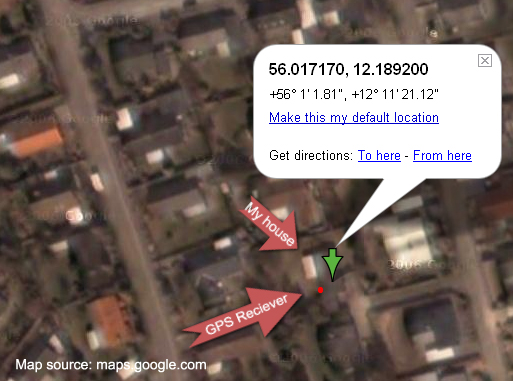
    Pretty simple really, just:
     http://maps.google.com?q=56.01717,12.18909


  • How stable is my GPS reciever with the new SirfStar III chipset
    I must admit that this reciever performs beyond what I had expected.
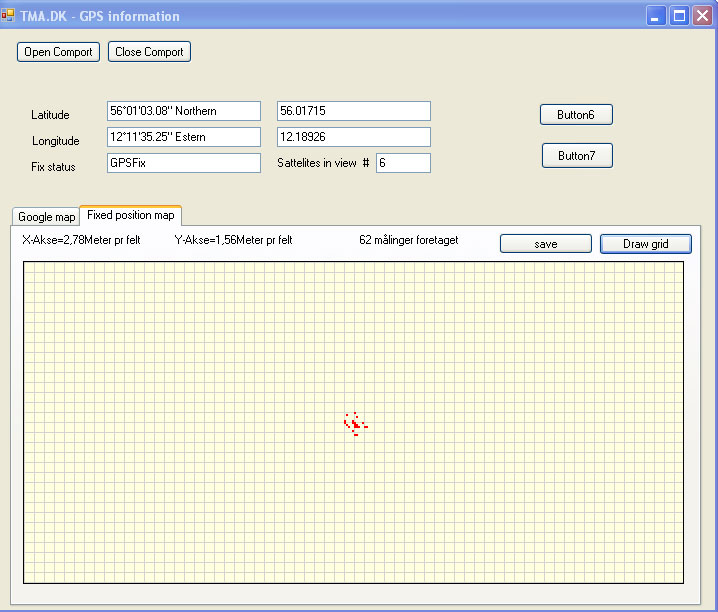
    This is a simple graph displaying how the position "jumps" around, when stationary.
    (X axis=2,78 Meters pr. square, Y axis=1,56 Meters pr.square, with 62 recieved GPS fixes)

    GPS map, stationary, using SirfStar III chipset


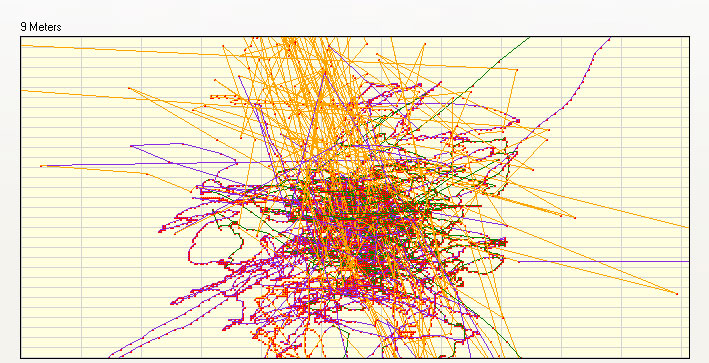
    This one is using the old SirfStar II chipset.
    GPS map, stationary, using SirfStar II chipset


  • Links to usefull pages and references

    Name Link
    National Geophysical Data Center(NGDC) http://www.ngdc.noaa.gov/seg/geomag/jsp/struts/calcDeclination
    GLOSSARY OF GPS TERMINOLOGY http://www.rbf.com/cgcc/glossary.htm
    Wikipedia's story on Magnetic declination http://en.wikipedia.org/wiki/Magnetic_variation
    NMEA Sentence information http://www.tma.dk/gps/nmeastrings.htm
    Deviation (Graphs) http://swepos.lmv.lm.se/english/sa.htm
    Google groups on the subject http://groups.google.dk/group/Google-Maps-API/browse_thread/thread/7b36c0f8b6a0d592/ab5580ea1b6adaaf?lnk=st&q=convert+NMEA+to+WGS-84+decimal&rnum=2&hl=da#ab5580ea1b6adaaf
    Jim Mischel's fantastic article on 'Computing Track Information in GPS' http://www.informit.com/guides/content.asp?g=dotnet&seqNum=513&rl=1


    Source:maps.google.com, my location using my GPS reciever


    Print
    How would you rate the quality of this content?

    1 2 3 4 5 6 7 8 9
    Bad  Superb
    Rating   

    Give your feedback here.(Tags, links etc. not allowed!)

    Your Name:  (optional)
    Your homepage: http:// (optional)
     (Type the numbers)


    Date Name Rate Message Homepage
    27-12-2011mrlychon9very good .thanks for postpdu.vn
    11-12-2011Fabiowsky9Very nice
    Had some useful info
     
    09-11-2011Ismail8Really helpful! 
    21-08-2011Trirath Thailand9Great web page. 
    06-07-2011Vincent Snijder9However .. by flooring the coordinate [Math.Floor(PosDb / 100)] you will loose some accuracy, not? 
    04-07-2011Vincent Snijder9Nice conversion-code for NMEA to decimal ...

    Much shorter than how I programmed it once :) -

    Latitude = Replace(Latitude, ., ,)
    Longitude = Replace(Longitude, ., ,)
    End If

    LatRight = Right(Latitude, 7)
    LongRight = Right(Longitude, 7)

    Strip long & lat to first decimals
    Latitude = Replace(Latitude, LatRight, )
    Longitude = Replace(Longitude, LongRight, )

    Convert to degrees , Rounded to 6 decimals
    Latitude = Math.Round(CDbl(CStr(CInt(Latitude) + (CDbl(LatRight) / 60))), 6)
    Longitude = Math.Round(CDbl(CStr(CInt(Longitude) + (CDbl(LongRight) / 60))), 6)

    Latitude = Replace(Latitude, ,, .)
    Longitude = Replace(Longitude, ,, .)

    Add trailing zeros
    Latitude = Latitude & String$(6 - (Len(Latitude) - InStr(Latitude, .)), 0)
    Longitude = Longitude & String$(6 - (Len(Longitude) - InStr(Longitude, .)), 0)

    Thanks !

    Vincent Snijder
    Netherlands
     
    13-06-2011Dev2Wouldnt run neither in VB.net 2005 or VB.net 2010 express. I wish the author shared his codes more freely. 
    30-05-2011George9very good work. thanks 
    11-05-20119 
    25-04-2011WSA9thank you 
    25-04-2011WSA9thank you 
    28-03-20119Thanks a lot!!! 
    21-03-20119 
    04-02-2011Kumar S.8Kind attn.: Mr. Thomas Tingsted Mathiesen

    Congrates. You have given wonderful info. I suggest you may update the site, taking into consideration of some errors and also to make compatible with Win 7 & Win 2008

    How to get better accuracy less than 9 meters?

    I am unable to download from your site .NET GPS API

    In short, it is excellent info and my deep appreciation.

    Thanks a lot and Happy New year.

     
    27-09-2010VSVLAD9Good work! 
    10-08-2010A.Kresnawan9Thanks Tom,

    Your shared code really heplfull....

     
    26-07-2010Carlos9Excelent! 
    23-07-2010Andy8The information herein is superb and deserved a place im my bookmark list. Thank you for collecting and sharing your knowledge. You rock! Regards from Austria. 
    17-06-2010PiotrG8 
    18-05-2010Cris9es la informacion mas concreta que e encontrado sobre el tema. y me gustaria poder enviarle la traduccion al español de su pagina si es que lo desea (cris_boliviabolivia.com) 
    13-04-2010Matti9Fantastic Article. Nice too see all this hard to get information in one easy to find spot !

    Thankyou for you hard work !
     
    30-03-20109 
    06-03-2010Shameem9Hi Mr Mathiesen,Im writing an app in vb6.how do i get to show my small vehicle icon at my gps location,just like u have the red dot on yours in google earth.Im referencing the googleearth.exe in my project.
    Thanx for any assistance.
     
    24-02-20109 
    23-02-20109 
    20-02-20107 
    17-11-20099 
    28-10-2009Artur9very usefulwww.matematyka-blog.info
    04-08-2009MMasri9 
    19-07-2009Johnn9 
    15-07-20099 
    02-05-2009Kevin9Excellent Application Thomas. 
    31-03-2009John9 
    09-03-2009zadania domowe8thankswww.trudne.pl
    01-03-2009Chris8Looks good but I cannot register the DLL in Windows Vista. The msg from regsvr32 is The module tmagpsapi.dll was loaded but the entry-point DllRegisterServer was not found. Any ideas please? 
    17-02-2009James9This page has been great in helping build an autoilot for my rc plane. 
    12-02-20097 
    12-02-2009Rickard9Sweet code! =) I had helped me with quite some stuff over the past month. Thanx alot.www.virtualpunk.com
    09-01-2009Medhat Dessouki9Very good work, efforts & Info.
    Well done.
    m_dessouki2002@yahoo.com
    31-12-2008Rasmus8Tusen tack Thomas. All information på ett och samma ställe. 
    02-12-2008Chris9Great work here. Do you by chance have or know where to get the formula to convert from WGS84 to SPCS83 ?www.caroneast.com
    01-12-2008Raman9Thomas, thank you so much for your efforts and hardwork to put together all.
    I am learning and novice programmer. I wanted to implement RealTime Distance caluculation, when I connect to my LapTop thru COM port. how can I do that? Can you give me some thoughts and suggestions
    please.
     
    01-12-2008vpolv9thanks.
    The info you provide is excellent and easy to understand.. thanks again...
     
    01-12-2008vpolv9thanks.
    The info you provide is excellent and easy to understand.. thanks again...
     
    25-10-20089 
    07-10-2008David Leach8In the NMEA to Decimal function, you need to check and convert to positive number before the calculations (FLOOR) are started. Other wise the floor of -9.5 returns -10 and the rest of the calculation gets off by 1. I also took off the first part that strips and replaced the . with a ,. It didnt seem to work as you intended and caused the whole string to look like a giant integer and wasnt necessary with my data anyway.

    Private Function toDecimal(ByVal Pos As String) As Double
    Pos=5601.0318
    Dim PosDb As Double = CType(Replace(Pos, ., ,), Double) Replace . with , (Used in danish doubles)
    Dim negbool As Boolean
    If (Pos 0) Then negbool = True

    Dim PosDB As Double = Math.Abs(CType(Pos, Double))
    Dim Deg As Double = Math.Floor(PosDB / 100)
    Dim DecPos As Double = Math.Round(Deg + ((PosDB - (Deg * 100)) / 60), 5)
    If negbool Then
    Return -DecPos
    Else
    Return DecPos =56.0172
    End If
    End Function
     
    25-09-20087 
    15-07-2008Luca9Hi Thomas,
    very useful page, thankyou!
    But I think there may be something wrong in DecimalPosToDegrees (or something I didnt understand): the NMEA result WITHSIGNS you show (56°13.18N) seems not to be correct since the WGS84 format value is 5601.0318 (where .0318 are decimal of minutes, not seconds). Moreover, in the NMEA output format case statement, the function should convert seconds to decimal of minutes. Am I wrong?
    Thank you again.
    Luca


    Hi Luca,
    I will check up on it..
    Thanks...
    /Thomas
     
    02-07-2008winbell@hotmail.com9good job 
    20-06-2008Jesus9Hi, Thomas.
    Thank you very much for your article, has helped mae a lot. Just one (maybe obvious) note.
    To convert Longitude you have to take the three first digits, as degress, while in Latitude you only take the first two ones. It has take a little bit to me to realize why I do not get the rigth Longitude.
    Thank you again.
    Jesus.
     
    14-06-2008Nicola9wow 
    12-06-2008Gaurav Agrawal7Article is excellent.could anyone give me source code for conversion from NMEA format(WGS84) to Meter Format(British National grid map) or Decimal to Meter conversion. 
    11-06-20089just what I was looking for! 
    19-05-2008Alex9very very good

     
    15-05-2008Yael9Thank you very much 
    08-05-2008nikos9Thank you Very Match 
    22-03-2008dzwonki7thxwww.dzwonker.pl
    05-03-2008andrew7Brilliant, thanx a lot !
    You dont by any chance also have a function for
    calulating a new posision given a position and a distance ?
    /andrew

    Hi Andrew
    No, sorry I haven't got that formula, but if you or anybody else in here knows of one I would very much like to post it here.

    /Thomas Mathiesen

     
    03-03-2008N. Tabatabai7Hi Thomas, first of all, Im happy to see developers helping each other. Information I get, was so helpfull and Exactly what I need. thank you 
    21-02-2008Joachim9Hi Thomas, very usefull information, thank you.
    Dont know if Im wrong, but: the GPS spec is nutty ... since there are only 90 degrees of latitude and 180 degrees of longitude the latitude values in degrees never have 3 digits ...

    so the spec for latitude is: ddmm.mmmm and longitude is: dddmm.mmmm

    In DecimalPosToDegrees you always add 3 zeros, this can cause problems
     
    11-02-2008Bek9Thank you very much, Thomas Mathiesen !!!!  
    02-02-20088 
    12-01-2008Azad9Hi Thomas,
    This is absolutely a great stuff. You said for Western and Southern hemispheres multiply with -1. So I have to change the source code if I change hemispheres? And is there any separate source code file for the dll?

    Hi Azad,
    No you don't have to change the code when changing hemisphere.
    With regars to the sourcecode of the tmagpsapi.dll, I do not wish to share this (Write me on tmatma.dk if you whant an explanation why)

    Kind regards.
    Thomas Mathiesen
     
    03-01-2008max9:) i like
    very helpful (i am writing a program which processes
    Navman gps data logs :D)
     
    13-12-2007N. V. Jensen9Det var lige hvad jeg manglede.nvjensen.dk
    05-12-2007hnguyen7great Job. Anyway, the decimal format is not correct, should be xx.xxxxx for Lat and yyy.yyyyy for Lon
    Please change and notice your update
    Appreciate it
    Thanks Thomas
     
    26-11-2007Rob9Great, was looking for this info a long time 
    30-10-2007Dan9Thanks for the help. Really great stuff with the Calculate distance and direction in degrees between two coordinates 
    01-10-20079 
    18-09-20078 
    18-09-2007Isaac9FANTASTIC!! Thanks so much! Really Great stuff! 
    11-09-2007B.9You are the MAN..!!
    Good to see developers helping each other :)
     
    05-09-2007Peter9Great collection of useful information and a nice API as well! 
    21-08-2007Cranesfreak8The info you provide is excellent and easy to understand 
    16-08-2007Fred1You wrote this huge error:
    Longitude is the Y axis (north-South) - False
    Latitude is the X axis (West-East) - False

    Please change also your worldmap picture...

    The real definition is the opposite!
    Latitude gives the location of a place on Earth north or south of the equator.
    Longitude is the east-west geographic coordinate.


    Jesus - you are right Fred - Must have been sleeping that day, sorry about that - I have removed it. (Update will follow)
    Thanks
      Thomas Mathiesen
     
    14-08-2007Andreas9Excellent Page with most useful information collected on one website! Thx a lot. 
    08-08-20079 
    02-08-2007Rosli9I try to fine conversion between wgs84 to local coordinates software for all countryplease help me for my problemliroii@yahoo.com
    26-07-2007Derrick9Good work Thomas and thank you. I was going nuts trying to understand why Google Earth decimal would not work with my NMEA output. 
    15-07-20077 
    01-07-2007Harikumar8Very good collection of most important codes for customised GPS /embedded GPS software developers 
    23-06-2007Can9After searching some minutes I ended up with this wonderful page. All I need to know was here. Thank you Thomas. 
    21-06-2007Paul H-T8I translated this info Excel functions, but my result was around 2000 km, when it should be under a km! Do you have an Excel version of these formulas available? I have some sample data and the formulas in a file that I could send to someone to double check.www.iwireless.com
    14-05-2007rexSalius9Wonderful site, Thomas. Why didnt I find it earlier.... -)

    Thanks
     
    12-05-2007David9Thank you very much for this info. It is very usefull and it avoided me to expend a lot of time in analyze. Thank you again Thomas. 
    09-05-2007Randy9Wonderful... !!!
    Is the GPS Infromation app available. I would like to look at the drift of my GPS unit.
     
    06-05-2007Javier6Thomas, I cant connect my usb garmin gps, any suggestions ?

    Hi Javier
    I have not testet the software on Garmin (Don't have one) - so if any of you could send me some raw Garmin GPS data I will try to support it.
    - Thomas Mathiesen
    www.netgis.com.ar
    04-05-2007Rick C.9Do you have any examples for geofencing calculation?

    Hi Rick
    No, I have not, but the subject is exciting, and I will look into it.
    Are you looking for ways to calculate when the position is outside a circle or shape?
    Regards
    -Thomas Mathiesen
     
    01-05-2007Robertr Brenner8Amazing what love for a hobby can create! 
    15-04-20079 
    14-04-2007Malcolm Haines7Its great to see all this info together. i too almost surfed myself stupid trying to piece it all together.

    Thanks Thomas!
     
    19-03-2007Aleksander Posmyk9lot of useful information. thx
    posmyk.info
    19-03-20079 
    10-03-2007Maksim Sviatlitski9Thomas, thank you so much for your efforts! This page was exactly what I was looking for!www.agile-sys.com
    28-02-2007Adam OConnor9Absolutely Exceptional 
    02-01-20079 
    01-01-20079 
    24-12-20069 
    22-12-2006Nasrullah8Lot of Thankswww.4bgroup.com
    15-12-2006Ubi Sumus6DecimalPosToDegrees has a tiny bug. In Germany we use , for decimal separator not a . NMEA gets confused by an additional ,

    We use ,(comma) for decimal seperation as you do, that is why I replace the .(dot) with a ,(comma)
    - Thomas
     
    11-12-20068 
    09-12-2006LazBoy8Thanks a billion!!
    Very informative page.
     
    27-11-2006landofshadows7What I was after was how to make an Excel forumla to convert Latitude & Longitude into a English Postcode... You see we have the Cordinates but need to see the location by postcode... and at the moment I am having to check them one at a time, 1,500 per day... any one able to help me email me please landofshadowslycos.co.uk (Subject GPS) 
    27-11-20067 
    24-11-20069 
    15-11-20069 
    14-11-20069Thanks for your nice work. 
    27-10-20069 
    16-10-2006Leonardo5Nice page,
    but, I think that in GPGGAs lat/lon the minutes are in radians, but the value after the comma means the decimal part of the minutes, not the seconds.
    see http://aprs.gids.nl/nmea/#gga
    Try the formula:DEGREES+(MINUTES+/60)
    - 56+(01.0318/60) in your example
    you are likely to get beter results

    leonardo(at)novageo(dot)pt

    -Thank you Leonardo, I have corrected the formula/Thomas Mathiesen
     
    15-10-20067Unfortunatly the link http://www.gpsinformation.org/dale/nmea.htm isnt working

    - Is up again/Thomas Mathiesen
     
    11-10-20066good work.. 
    09-10-20065 
    06-10-20069Ive been looking for this information for some time now, thank a lot guys the content is great. 
    04-10-20069 
    01-10-20069Very nice... Had some useful info :) 
    06-09-20069 
    29-08-2006Peter Cranstone9Great job. Exactly what we needed.

    Peter.Cranstone5o9inc.com
     
    14-08-20068Thanks. This realy helped me a lot. 
    09-08-20069 


     Top 50 Google search phrases resulting in hit on http://www.tma.dk/gps
  • vb.net gps
  • t
  • nmea wgs84
  • nmea conversion
  • wgs84 format
  • gps vb.net
  • nmea to decimal
  • nmea convert
  • convert nmea
  • nmea converter
  • gps wgs84
  • nmea coordinates
  • wgs84 distance
  • wgs84 gps
  • convert wgs84
  • wgs84 converter
  • nmea vb.net
  • gps distance formula
  • convert nmea to decimal
  • wgs84 nmea
  • wgs84 convert
  • wgs84 distance calculation
  • nmea to wgs84
  • nmea distance
  • wgs 84 format
  • vb.net nmea
  • google maps vb.net
  • wgs84 formula
  • wgs format
  • nmea excel
  • nmea vb
  • nmea to excel
  • gps coordinate conversion formula
  • wgs-84 format
  • f
  • gps conversion formula
  • convert nmea to decimal degrees
  • gps vb
  • calculate distance wgs84
  • wgs84 excel
  • convert nmea to wgs84
  • wgs84 conversion formula
  • wgs84 calculate distance
  • nmea commands
  • distance wgs84
  • gps to wgs84
  • google map vb.net
  • convert nmea coordinates
  • nmea decimal
  • nmea coordinate
  • I know the above list might be "annoying", but it does help you find the content of this page, so bare with me..